There is a specific moment that turns secrets management from a checkbox into a habit. You export a workflow to share it with a teammate, open the JSON, and see your production API key sitting there in plain text. Not redacted. Not referenced. Just there - ready to be pasted into a Slack thread or committed to a repo.
n8n has a clean answer to this: the External Secrets feature, which pulls credentials at runtime from a managed vault. It currently supports HashiCorp Vault, AWS Secrets Manager, Azure Key Vault, GCP Secret Manager, and 1Password via Connect Server. The catch is that it is an Enterprise feature, and it assumes you already run a secrets manager. For a solo operator or a small team, that means either paying for an Enterprise license or standing up and babysitting a Vault cluster for a handful of API keys. That is real overhead, and for most self-hosted setups it is overhead you do not need.
The good news: n8n ships with enough to get encryption at rest, access control, and rotation without any of that. The trick is knowing which built-in mechanism to use for which kind of secret, because the word “secrets” hides two different problems.
Two kinds of secrets, two different tools
This is the distinction that most guides skip, and skipping it leads to advice that is either insecure or simply broken on current versions.
Infrastructure secrets configure the n8n instance itself: the encryption key, the database password, the SMTP password, the session JWT secret. These live in environment variables and, ideally, in Docker or Kubernetes secrets.
Workflow secrets are the credentials your automations use to talk to the outside world: the Stripe key, the OpenAI token, the database login a workflow queries. These belong in n8n’s built-in, encrypted credential store, not in environment variables.
If you remember nothing else, remember that. Reaching for $env to inject an API key into an HTTP Request node feels clever - but on n8n 2.x it is both blocked by default and a worse choice than the tool built for the job. We will get to why.
The mental model: four layers people confuse
Before any config, it helps to name the four things that get lumped together as “variables” or “secrets” in n8n. Each has a different storage model and a different access path.
| Layer | What it is | Where it is stored | How you reach it | Use it for |
|---|---|---|---|---|
Instance env vars (N8N_*) | Configuration of the instance | Process environment / .env / secret files | $env in expressions (gated) | Infra config and infra secrets |
| Credentials | Encrypted store for integration auth | n8n database, encrypted with the encryption key | Credential picker on a node | API keys, OAuth, DB logins used by workflows |
Variables ($vars) | User-defined key/value pairs | n8n database, visible in the UI | $vars in expressions, read-only | Non-secret config shared across workflows |
| External Secrets | Live pull from an external vault | The external vault | Credential references | Centralized, multi-instance secret management |
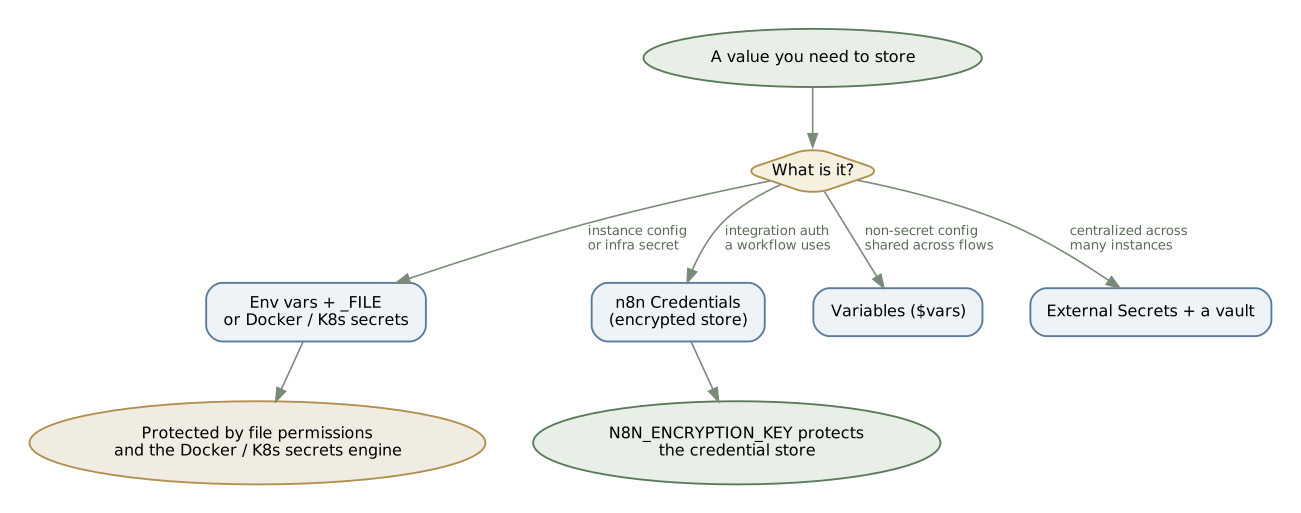
Two of these are commonly misused. Variables ($vars) look like a place to stash secrets, but they are stored in the database and shown in plain text in the UI, and the feature is part of the Enterprise Environments offering. They are for things like a base URL that differs per environment, not for a token. And External Secrets is the very thing we are choosing to avoid.
That leaves environment variables and credentials as the workhorses. The rest of this article is about using them well.
The foundation: N8N_ENCRYPTION_KEY
Everything in the credential store is encrypted with a single symmetric key. If you set nothing, n8n generates one on first boot and writes it to /home/node/.n8n inside the container. That auto-generation is exactly what bites people: if the container restarts without that directory persisted, or you migrate to a new host without carrying the key - n8n generates a fresh one and every stored credential becomes undecryptable. A database dump alone will not save you, because the dump is encrypted with a key you no longer have.
So the first rule of n8n secrets is to set the key explicitly and treat it as the most precious thing in your deployment.
Generate a strong key:
openssl rand -hex 32If you prefer Node, which is already on the box:
node -e "console.log(require('crypto').randomBytes(32).toString('hex'))"Critical:
N8N_ENCRYPTION_KEYis effectively permanent for the lifetime of your credentials. Lose it or let it silently change - and there is no recovery path for your stored credentials other than re-entering every one of them by hand. Generate it once, store it in a password manager or a secret manager, and back it up separately from your database.
One more thing that trips up scaled deployments: in queue mode, the main process and every worker must share the same encryption key. Different keys across workers produce a stream of “missing encryption key” or decryption errors that look like data corruption but are really a configuration mismatch.
Step one: .env and Docker Compose
For a single-instance deployment, the simplest safe pattern is a .env file that never enters version control, feeding a Compose stack.
Your .env:
POSTGRES_USER=n8nPOSTGRES_PASSWORD=REPLACE_WITH_STRONG_PASSWORDPOSTGRES_DB=n8nN8N_ENCRYPTION_KEY=REPLACE_WITH_OPENSSL_HEX_32N8N_USER_MANAGEMENT_JWT_SECRET=REPLACE_WITH_RANDOM_STRINGN8N_HOST=n8n.example.comWEBHOOK_URL=https://n8n.example.com/GENERIC_TIMEZONE=Europe/KyivN8N_USER_MANAGEMENT_JWT_SECRET signs the session tokens behind n8n’s login. Set it explicitly - if you leave it to chance it can change on you and invalidate sessions. Note what is not here: there is no N8N_BASIC_AUTH_ACTIVE. Basic auth and the old JWT auth mode were removed in n8n 1.0, so any tutorial or AI answer telling you to gate access with basic auth is years out of date. Access control is now user management plus a reverse proxy.
A matching compose.yaml:
services:  postgres:    image: postgres:18.4-alpine    restart: unless-stopped    environment:      POSTGRES_USER: ${POSTGRES_USER}      POSTGRES_PASSWORD: ${POSTGRES_PASSWORD}      POSTGRES_DB: ${POSTGRES_DB}    healthcheck:      test: ["CMD-SHELL", "pg_isready -U ${POSTGRES_USER} -d ${POSTGRES_DB}"]      interval: 10s      timeout: 5s      retries: 5    volumes:      - postgres_data:/var/lib/postgresql/data
  n8n:    image: docker.n8n.io/n8nio/n8n:2.22.5    restart: unless-stopped    depends_on:      postgres:        condition: service_healthy    ports:      - "5678:5678"    environment:      DB_TYPE: postgresdb      DB_POSTGRESDB_HOST: postgres      DB_POSTGRESDB_PORT: 5432      DB_POSTGRESDB_DATABASE: ${POSTGRES_DB}      DB_POSTGRESDB_USER: ${POSTGRES_USER}      DB_POSTGRESDB_PASSWORD: ${POSTGRES_PASSWORD}      N8N_ENCRYPTION_KEY: ${N8N_ENCRYPTION_KEY}      N8N_USER_MANAGEMENT_JWT_SECRET: ${N8N_USER_MANAGEMENT_JWT_SECRET}      N8N_HOST: ${N8N_HOST}      WEBHOOK_URL: ${WEBHOOK_URL}      GENERIC_TIMEZONE: ${GENERIC_TIMEZONE}    volumes:      - n8n_data:/home/node/.n8n
volumes:  postgres_data:  n8n_data:
Pin the image to a specific tag in production instead of latest, so a docker compose pull never surprises you with a major version mid-incident (the examples here pin 2.22.5; check the current release when you read this and use a recent one). And keep secrets out of Git with a .gitignore that excludes .env, paired with a committed .env.example that has the keys but no values.
This is a solid baseline. It is not the finish line, and here is the nuance that pushes you further: anyone who can run docker inspect on the container, or read the process environment, can read every value in that environment: block in clear text. On a single-tenant box you control, that is an acceptable trade. The moment more people have shell access, you want the secrets off the process environment entirely.
Step two: getting plaintext out with the _FILE convention
n8n supports a small but powerful convention: append _FILE to a variable name and n8n reads the value from a file path instead of the variable. This is built specifically to consume Docker and Kubernetes secrets, which are mounted as files. If you set both the plain variable and its _FILE counterpart, the file wins.
Here is the same stack, hardened so the sensitive values come from secret files rather than the environment:
services:  postgres:    image: postgres:18.4-alpine    restart: unless-stopped    environment:      POSTGRES_USER: ${POSTGRES_USER}      POSTGRES_PASSWORD_FILE: /run/secrets/postgres_password      POSTGRES_DB: ${POSTGRES_DB}    healthcheck:      test: ["CMD-SHELL", "pg_isready -U ${POSTGRES_USER} -d ${POSTGRES_DB}"]      interval: 10s      timeout: 5s      retries: 5    secrets:      - postgres_password    volumes:      - postgres_data:/var/lib/postgresql/data
  n8n:    image: docker.n8n.io/n8nio/n8n:2.22.5    restart: unless-stopped    depends_on:      postgres:        condition: service_healthy    ports:      - "5678:5678"    environment:      DB_TYPE: postgresdb      DB_POSTGRESDB_HOST: postgres      DB_POSTGRESDB_DATABASE: ${POSTGRES_DB}      DB_POSTGRESDB_USER: ${POSTGRES_USER}      DB_POSTGRESDB_PASSWORD_FILE: /run/secrets/postgres_password      N8N_USER_MANAGEMENT_JWT_SECRET_FILE: /run/secrets/n8n_jwt_secret      N8N_HOST: ${N8N_HOST}      WEBHOOK_URL: ${WEBHOOK_URL}    secrets:      - postgres_password      - n8n_jwt_secret    volumes:      - n8n_data:/home/node/.n8n
secrets:  postgres_password:    file: ./secrets/postgres_password.txt  n8n_jwt_secret:    file: ./secrets/n8n_jwt_secret.txt
volumes:  postgres_data:  n8n_data:
Create the secret files so they contain the value and nothing else:
mkdir -p secretsprintf '%s' "$(openssl rand -hex 32)" > secrets/n8n_jwt_secret.txtprintf '%s' 'your-strong-db-password' > secrets/postgres_password.txtchmod 600 secrets/*.txtNotice printf '%s' rather than echo. This is the kind of detail that costs an evening of debugging. echo appends a trailing newline, and n8n reads the file verbatim, so the newline becomes part of your password or token and authentication fails with no obvious reason. Use printf and you avoid the whole class of “the value is right but it still rejects it” problems. Since n8n 2.7.0 the failure is at least diagnosable: n8n still reads the file as-is, because a certificate or key may legitimately end in a newline, but it now logs a warning when a _FILE value has leading or trailing whitespace, so the cause shows up in your logs instead of as a silent rejection.
You will have spotted that the encryption key is missing from the _FILE example above - and that is deliberate. N8N_ENCRYPTION_KEY_FILE is documented to work, but it has open bugs in queue mode where workers fail to start because they do not resolve the file before looking for the key (see issue #20175 and related reports). The runner image has had a similar gap with N8N_RUNNERS_AUTH_TOKEN_FILE. For a single-instance setup the _FILE variant of the key generally behaves, but if you run queue mode, the pragmatic move today is to set N8N_ENCRYPTION_KEY directly on the main and all workers. If you want the key off the environment too, a tiny entrypoint that reads the file into the variable before launching n8n sidesteps the bug entirely.
Certificates and key files (a .pem for an mTLS connection, a service-account JSON) fit this model as well. Mount them on a read-only volume and read them with the Read/Write Files node. On n8n 2.x, be aware that file access is restricted by default: the .n8n directory is blocked, and file nodes are confined to an allowed path. To read your mounted certs you set N8N_RESTRICT_FILE_ACCESS_TO to include that path explicitly.
Workflow secrets the right way: native credentials
Now the part that most “use environment variables for secrets” tutorials get wrong. For the API keys your workflows use, the correct store is n8n’s credential system, and it is better than the env-var approach on every axis that matters.
Credentials are encrypted at rest in the database with your encryption key, and access to them is restricted by default. You attach a credential to a node by selecting it, and the actual value never appears in the workflow JSON. Export that workflow and you export a reference, not the secret.
There is a security property here that is easy to miss. A credential’s value never becomes part of the workflow JSON or a node’s output: it is applied to the request internally and stays out of the data n8n stores and shows when you inspect a run. A value you inject through an expression, including $env, behaves differently. It becomes part of the node’s parameters and flows into the execution data, where it surfaces in the editor, in execution history, and in any export or screenshot. So “secrets via $env” does not just bypass the tool built for the job - it can quietly scatter the secret across your run history and your shared workflows. If you separately need to hide node payloads from people who can view a workflow, n8n has an opt-in execution data redaction control, but that is a different feature, not a substitute for using credentials.
This is also why n8n changed the default. As of the v2.0 release, N8N_BLOCK_ENV_ACCESS_IN_NODE defaults to true, so $env in expressions and the Code node returns nothing unless you deliberately re-enable it. The official guidance is explicit: for sensitive data, use credentials. If you upgraded from 1.x and your $env expressions suddenly return empty, this is why, and the v2.0 migration report will flag the affected workflows.
Two more things the credential system gives you for free:
- Scoped access. On n8n 2.x you can put credentials inside Projects and control which team members can use them, which is access control you would otherwise be building yourself around a
.env. - Programmatic rotation. The public API gained a
PATCH /credentials/:idendpoint that updates an existing credential by ID, with an option to merge only the changed fields. That is the hook you need to automate secret rotation without deleting and recreating credentials, which used to be the only path.
When you really do need env vars inside a workflow
There are legitimate cases for reading the environment inside a workflow, but they are about configuration, not secrets: a base URL that differs between staging and production, an internal service hostname, an environment name you want to log. This is configuration injection, not “dynamic secrets” in the Vault sense of short-lived generated credentials. Calling it the latter is how people end up putting real tokens where they do not belong.
If you have decided the value is non-sensitive and you control the instance, re-enable access:
N8N_BLOCK_ENV_ACCESS_IN_NODE=falseThen reference it in an expression:
{{ $env.APP_BASE_URL }}In the Python Code node the same object is _env rather than $env, which is a small surprise worth knowing before you waste time debugging.
Now the risk you are accepting. Re-enabling env access is global. On a multi-user instance, any user who can add a Code node can read the entire environment, including your database password and SMTP credentials. That is precisely why n8n flipped the default to blocked, and why the community guidance for shared instances is to keep it blocked and also exclude the Execute Command node, which is another route to the host.
If you want one or two config values available to builders without opening the whole environment, a clean pattern is to map only those values in a Set node at the top of the workflow, and have the rest of the workflow read from that node. It keeps the workflow portable across environments and limits exposure to exactly what you chose to expose.
A final, niche detail that has eaten real debugging time: proxy variables follow proxy-from-env precedence, where the lowercase form (http_proxy) wins over the uppercase form (HTTP_PROXY) when both are set. If your outbound requests ignore the proxy you configured, check for a lowercase twin.
Per-environment secrets without a vault
A common reason people reach for Vault is wanting different secrets in dev, staging, and production. You can solve this without it, but you have to know one limitation up front.
The straightforward approach is a separate .env (or separate secret files) per environment, with each instance carrying its own values. Where it gets subtle is n8n’s Source Control and Environments feature, which syncs workflows through Git. It deliberately does not sync credentials between instances. Git moves your workflow definitions; it does not move your secrets. So a workflow promoted from staging to production expects a credential of the same name to already exist in production, configured with production values. That is a feature, not a gap, but it is one that surprises people who assume a Git push carries everything.
And again, Variables ($vars) do not fill this role on the community edition: they are an Enterprise capability and are not for secrets in the first place.
Locking down the perimeter
Secrets are only as safe as the access to the files and nodes around them. n8n 2.x ships with sensible defaults here, but they are worth knowing and confirming.
- Protect the data directory.
N8N_BLOCK_FILE_ACCESS_TO_N8N_FILES=trueblocks workflow file operations from reaching the.n8ndirectory, which is where the database, the encryption key, and credentials live. - Exclude dangerous nodes. Use
NODES_EXCLUDEto remove high-risk nodes like Execute Command and SSH on instances where users are not fully trusted. Execute Command is already disabled by default on 2.x. - Enforce file permissions.
N8N_ENFORCE_SETTINGS_FILE_PERMISSIONS=truerequires the config file to be0600, the same posture SSH uses for private keys. - Constrain file nodes.
N8N_RESTRICT_FILE_ACCESS_TOlimits where file nodes can read and write, which matters as soon as you start mounting secret files. - Use Postgres in production. SQLite is fine for local work, but Postgres is the right call for anything real, and the official self-hosting images and starter kits assume it.
- Terminate TLS at a reverse proxy. Put n8n behind Nginx, Caddy, or Traefik with HTTPS. Since basic auth is gone, the proxy plus user management is your front door.
- Keep secure cookies on. n8n marks its session cookie as
Secureby default, so login only works over HTTPS. Behind a proxy this is the classic first-deploy wall: reach the instance over plain HTTP, or forget to forward the right headers, and the login silently fails. The fix is real HTTPS plus correct proxy config (N8N_PROTOCOL=httpsandN8N_PROXY_HOPSset to the number of proxies in front of n8n), notN8N_SECURE_COOKIE=false. Turning the flag off only removes the protection and is defensible solely on a throwaway local instance.
Key rotation: two different things people conflate
“Rotating the n8n key” means two completely different operations, and mixing them up is how people lock themselves out.
The first is rotating N8N_ENCRYPTION_KEY itself. There is no automatic re-encryption: the master key is assumed stable, so changing it is a manual, planned operation. You back up the database, export credentials decrypted under the old key, swap the key, then re-import so everything is re-encrypted under the new one. The relevant CLI commands run inside the container (docker exec -u node -it <container> ...):
# 1. Export every credential, decrypted under the current keyn8n export:credentials --all --decrypted --output=credentials.json# 2. Swap N8N_ENCRYPTION_KEY and restart the instance# 3. Re-import so each credential is re-encrypted under the new keyn8n import:credentials --input=credentials.jsonThat credentials.json holds every secret in clear text, so write it somewhere you wipe the moment the import finishes, never to the repo or a persisted volume. On Enterprise instances this is rougher, because features like External Secrets store their own encrypted config and break on a key change unless you clear and reconfigure them (tracked in issue #22478). Plan it as a maintenance window, not a quick swap.
The second is the encryption key rotation feature, enabled with N8N_ENV_FEAT_ENCRYPTION_KEY_ROTATION=true. This is envelope encryption: your N8N_ENCRYPTION_KEY stays put as a master key, and n8n manages a separate data encryption key that it generates, stores encrypted in the database, and lets you rotate. You can see active keys under Settings, in the Data Encryption Keys panel.
Critical: Enabling the rotation feature is a one-way change with no rollback. Once n8n starts writing data in the new key-identifier format, turning the flag back off, or downgrading n8n, makes everything encrypted after you enabled it permanently unreadable. The only recovery is a database backup taken before you enabled it. Take a full backup first, enable it on staging, confirm credentials still decrypt, and only then touch production. All instances must share the same
N8N_ENCRYPTION_KEY.
Whichever path you are on, a few operational habits make rotation boring instead of scary. Name credentials with intent, something like service-env-version (stripe-prod-v2), so a rotation is a new credential rather than an in-place edit. During the rotation window, keep both the old and new secret valid on the provider side, so in-flight executions do not fail. And roll forward with a canary: point one or two low-risk workflows at the new credential, watch them, then move the rest. This is the difference between a controlled change and a 2 a.m. outage.
Hands-on: a Vault-free setup end to end
Putting it together for a single-instance production deployment.
Step 1. Build the .env and the secret files. Split system secrets from non-secret config. The database password, encryption key, and JWT secret go into secret files; the base URL and timezone stay as plain config. Generate the random values with openssl rand -hex 32 and write them with printf as shown above.
Step 2. Write the Compose stack. Use the hardened _FILE Compose from the section above, with Postgres for storage and a named volume for /home/node/.n8n. Pin the image tag.
Step 3. Launch and create the owner. Run docker compose up -d, open the instance through your reverse proxy, and complete the user-management setup to create the owner account.
Step 4. Use a credential, not $env, for the integration. Add an HTTP Request node, create a credential for the target API (for example a Header Auth credential holding the token), and select it on the node. This is the path you want for the secret. Separately, if you have a non-sensitive value like APP_BASE_URL that you want in the workflow, set N8N_BLOCK_ENV_ACCESS_IN_NODE=false and read it with {{ $env.APP_BASE_URL }}. Keep that strictly for config, never for the token.
Step 5. Prove the secret does not leak. Execute the node, then export the workflow (Download) and open the JSON. The token is nowhere in it - the node carries only a reference to the credential. Pass that same token through $env into a field instead, and it lands in the node’s parameters and the execution data, visible in the editor and in every export. Same secret, opposite exposure.
When External Secrets is worth the overhead
This setup covers the large majority of self-hosted deployments, but it has a boundary, and it is worth stating so you know when you have outgrown it. External Secrets earns its overhead when you are managing secrets across many n8n instances from one place, when you need short-lived secrets that are generated and expire on a tight cycle, when compliance requires centralized auditing of who accessed what, or when secret rotation is an organization-wide process rather than a per-instance task. If that is you, the Enterprise feature and a real vault are the right tools. If it is not, you now have everything you need without them.
Production checklist
N8N_ENCRYPTION_KEYgenerated withopenssl rand -hex 32, stored in a password or secret manager, and backed up separately from the database. Not left to auto-generation.- Infrastructure secrets supplied through
_FILEplus Docker or Kubernetes secrets, not exposed in the Composeenvironment:block. Secret files written withprintf, notecho. - Integration API keys stored as credentials, never in environment variables.
$envaccess in workflows left blocked (N8N_BLOCK_ENV_ACCESS_IN_NODE=true), or, if needed for config, limited via a Set node on a trusted instance.- Dangerous nodes excluded with
NODES_EXCLUDE,.n8nfile access blocked, config file permissions at0600. - Postgres for storage; access only through a reverse proxy with TLS.
- Tokens absent from any workflow JSON export.
- If
N8N_ENV_FEAT_ENCRYPTION_KEY_ROTATIONis enabled: full database backup taken beforehand, tested on staging, and the team understands it cannot be undone.
Get the encryption key right, keep the two kinds of secrets in their proper homes, and harden the perimeter around them. That is most of what a vault would have done for you - with none of the cluster to run.