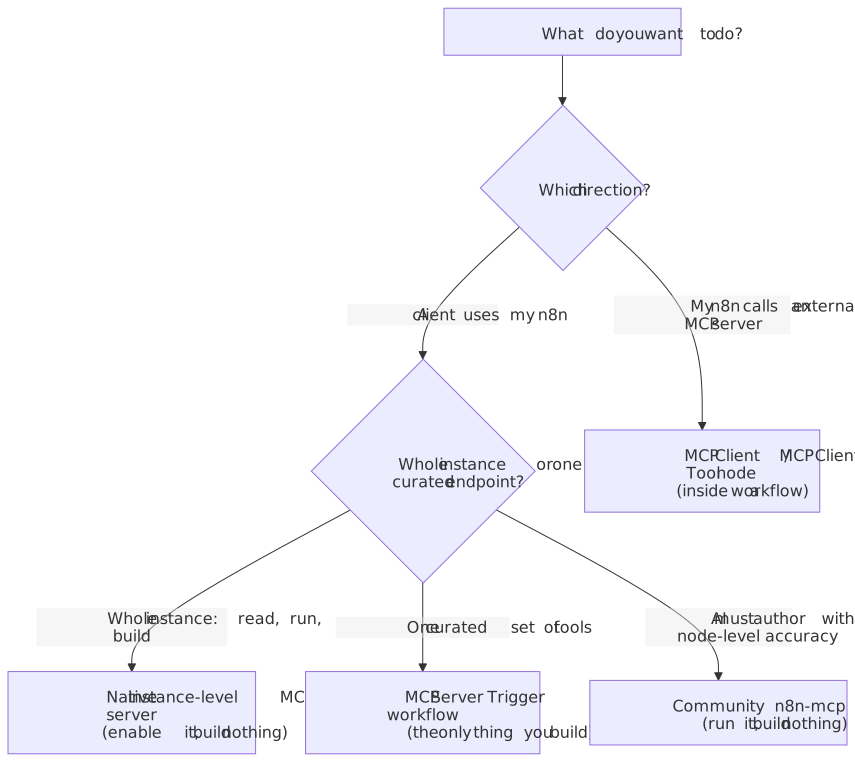
“Building an MCP server for n8n” sounds like one task. It is at least three, and for the two most common goals you build nothing at all. The phrase gets attached to n8n’s native instance-level MCP server, which you enable; to the MCP Server Trigger node, which is the only thing you literally build; and to a community server such as czlonkowski/n8n-mcp, which you run as a separate process. A fourth thing, the MCP Client and MCP Client Tool nodes, points the opposite way and is constantly confused with the rest.
The second fact matters specifically for self-hosting, and almost everyone skips it: Claude’s custom connectors reach your server from Anthropic’s cloud, not from your laptop. A self-hosted n8n must therefore be reachable over the public internet for Claude to use it at all, while local stdio servers only work in Claude Desktop and Cursor and never in claude.ai. Pick the direction and the client first. Everything else follows from there.
This guide targets operators running self-hosted n8n 2.x in production, comfortable with Docker Compose, who want to read, run, or build n8n workflows from Claude (Desktop, claude.ai, or Code) or Cursor. The versions and behavior below were checked against current sources as of June 2026: n8n 2.25.x, current Claude and Cursor clients, MCP over Streamable HTTP and SSE.
What “MCP server for n8n” means
Set the map before touching any setup. Four distinct things share the label, and conflating them is where most setups go sideways.
The first is n8n’s native instance-level MCP server. You turn it on at the instance level, opt in the workflows you want, and connect a client once per instance. It is built into every edition, including the free self-hosted Community Edition, and it now covers most of what people historically reached for a community server to do.
The second is the MCP Server Trigger node. This is the only path where you build a server. You drop the trigger into a single workflow, wire tool nodes to it, and that one workflow becomes a standalone MCP endpoint exposing exactly the tools you connected.
The third is a community server such as czlonkowski/n8n-mcp. You run it as a separate process alongside n8n. Its job is node-level accuracy: deep node documentation, schema and parameter validation, and template discovery so an AI client produces workflows that run on the first attempt.
The fourth is the inverse: the MCP Client node and MCP Client Tool node make n8n a consumer of external MCP servers. This is the opposite direction from the other three and deserves a hard mental separation, which it gets near the end of this article.
If your goal is simply “let Claude and Cursor work with my workflows”, the native server is the answer and you are mostly done after enabling it. The other options exist for narrower needs.
How Claude and Cursor connect, and why the client decides everything
The client’s connection model gates which server is even usable, so it comes before any server-side decision.
For Claude, there are two paths. Custom connectors are remote MCP servers added under Customize > Connectors with the ”+” button. The load-bearing detail: when you add a custom connector, Claude connects to your server from Anthropic’s cloud infrastructure, not from your local device, and this is true across claude.ai, Claude Desktop, Cowork, and the mobile apps. A server behind a VPN, on a private network, or blocked by a firewall will not connect even though you can reach it from your own machine. If your n8n is firewalled, you allowlist Anthropic’s outbound IP range (160.79.104.0/21) so connections from Claude’s cloud can reach it.
The other Claude path is local stdio servers defined in claude_desktop_config.json. These run on your machine and only work in Claude Desktop. They do not work in claude.ai or Cowork. A few plan limits are worth knowing before you start: free users are limited to one custom connector, and on Team or Enterprise an Owner must enable connectors for the organization before members can connect individually.
For Cursor, MCP servers are configured in .cursor/mcp.json for a single project or ~/.cursor/mcp.json globally, and managed under Settings > Tools & MCP (older builds placed this under Features). Cursor supports local stdio and remote servers over Streamable HTTP, with OAuth for authenticated remotes. One practical limit is worth knowing: Cursor only surfaces a bounded number of tools to the model at once, so enable only the servers you need in a given project. The exact ceiling is not in the official docs - community reports put it around 40 tools across all servers, and very long combined server-plus-tool names have also been reported to fail - so treat both as undocumented behavior, not a fixed contract.
On transport, prefer Streamable HTTP for anything new. SSE still works but is on a deprecation path across the ecosystem, including Claude’s connectors, so do not build a fresh setup around it.
The single fact to internalize: claude.ai can only use remote, publicly reachable servers, brokered from Anthropic’s cloud. Local stdio is Claude Desktop and Cursor only. Decide your client before you decide your server.
Option A: n8n’s native instance-level MCP server
This is the default answer for “connect Claude and Cursor to my workflows” today. One connection per instance lets clients discover, read, run, and now build and update workflows, with centralized authentication. It is available in every edition, including free self-hosted Community, and is not Enterprise-gated. Building and updating workflows arrived in the 2.14.0 line and is still a public preview, not generally available; n8n recommends running 2.18.4 or higher for the best workflow-building experience, and the update tool switched to partial updates in 2.20.0.
Enabling it. Turn MCP on at the instance level under Settings > Instance-level MCP, which requires instance owner or admin permissions. On self-hosted you can also manage this through environment variables. Then opt in each workflow individually in its workflow settings. The behavior here has a sharp edge worth stating plainly: the search tool can list every workflow a user has access to regardless of its per-workflow MCP setting, so enabling MCP at the instance level already exposes the existence and names of workflows the connected user can see, even before you opt any single workflow in. It surfaces previews, not full workflow data, but the names alone can leak more than you expect.
Connecting clients. Copy the instance server URL from the connection details, then authenticate with OAuth or a personal MCP access token, and manage who is connected from the Connected clients tab. n8n is now also a first-party connector in Claude’s connector directory, so in Claude you can add n8n from the directory and point it at your instance URL rather than configuring a fully manual custom connector. Either way, a self-hosted instance still has to be publicly reachable, because the connection originates from Anthropic’s cloud.
The traps. Three things catch people. First, execute_workflow defaults to production mode and runs the published version of a workflow; it supports a manual mode for the current unpublished version, but the default is production, so an AI client can trigger live automations. Second, visibility is user-scoped, not client-scoped: every client you connect as a given user inherits the full set of MCP-enabled workflows that user can access, so connecting a second tool does not give you a second, narrower scope. Third, most tools operate on unpublished workflows, which is convenient for building but means an AI can edit drafts you have not reviewed.
Option B: building an MCP Server Trigger workflow
This is the only path where you literally build a server, and you reach for it when you want to expose a specific, curated set of tools as one endpoint rather than open the whole instance. The MCP Server Trigger connects only to tool nodes, and it exposes exactly those tools to any client that can list and call them.
The build is short. Add the MCP Server Trigger node to a workflow, connect the tool nodes you want to expose, then activate and publish the workflow so the production URL goes live. The node hands you a test URL and a production URL; clients use the production URL.
Authentication. The node’s documented authentication methods are Bearer Auth and Header Auth. For Bearer Auth you create a credential and enter a token, which can be any sufficiently long random string. One detail that bites: once you save the credential you cannot view or edit the token again, so store it somewhere first. You do not need to hand-encode a base64 token despite what some guides show; set the token directly on the credential. Never leave the endpoint unauthenticated if it is reachable from outside your network.
Connecting from Claude Desktop. Because this endpoint is a remote SSE or Streamable HTTP server, connecting it to Claude Desktop as a local stdio entry means running a gateway that proxies stdio to the remote endpoint. The n8n docs show a claude_desktop_config.json entry that launches mcp-remote with your MCP URL and bearer token as placeholders. For claude.ai or any remote custom connector, you point directly at the production URL instead.
Reverse-proxy gotchas. Disable proxy response buffering for the MCP path, since buffering breaks streaming responses. Account for both SSE and Streamable HTTP behavior on the connection. And in queue mode with multiple webhook replicas, route all /mcp* traffic to a single dedicated webhook replica, because the persistent SSE or Streamable HTTP connection has to be handled by the same server instance for its lifetime.
Option C: the community n8n-mcp server
This server is not redundant with the native one. Its value is everything the native server does not specialize in: deep node search, per-node schemas and parameter examples, multi-level validation, and template discovery, all aimed at making Claude and Cursor produce correct workflows on the first pass instead of failing on a wrong parameter. You run it; you do not build it. It moves fast; at the time of writing it is on the 2.57.x line.
It ships two tiers of tools. Seven core tools work with no n8n credentials at all: tools_documentation, search_nodes, get_node, validate_node, validate_workflow, search_templates, and get_template. These are pure node knowledge and validation, drawn from a local node database. The second tier is management tools (n8n_create_workflow, n8n_update_partial_workflow, n8n_list_workflows, and so on) that read and write your actual instance. These only activate when you set N8N_API_URL and N8N_API_KEY, so the server is read-and-validate-only until you deliberately give it API access.
You run it with npx or Docker, over stdio for a local client or HTTP for a remote one. The stdio shape is the same mcpServers block Claude Desktop and Cursor both use, so a local config in claude_desktop_config.json or .cursor/mcp.json looks like this:
{ "mcpServers": { "n8n-mcp": { "command": "npx", "args": ["n8n-mcp"], "env": { "MCP_MODE": "stdio", "LOG_LEVEL": "error", "DISABLE_CONSOLE_OUTPUT": "true", "N8N_API_URL": "REPLACE_WITH_YOUR_N8N_URL", "N8N_API_KEY": "REPLACE_WITH_YOUR_N8N_API_KEY" } } }}Leave N8N_API_URL and N8N_API_KEY out and you get the seven read-and-validate core tools only; add them and the management tools that touch your instance switch on.
Self-hoster gotcha: when
N8N_API_URLpoints atlocalhostorhost.docker.internalbecause n8n runs on the same box, setWEBHOOK_SECURITY_MODE=moderate. The server’s SSRF protection rejects loopback addresses in its defaultstrictmode, which otherwise blocks the API client and webhook triggers.moderateallows localhost while still blocking private network ranges and cloud metadata endpoints;permissiveopens RFC1918 too and is only safe on a trusted private network.
Prefer this server over the native one when the work is authoring-heavy in Claude Code or Cursor and node-level accuracy matters more than one-connection instance access. For “run my existing workflows from chat”, the native server is simpler.
The inverse you will confuse this with: n8n as an MCP client
Everything above makes n8n an MCP server that clients talk to. The MCP Client Tool node and the standalone MCP Client node do the reverse: they let an n8n workflow consume tools from an external MCP server. The Client Tool node attaches to an AI Agent and exposes a remote server’s tools to that agent; the standalone Client node lets any step in a workflow call an external MCP server without an agent.
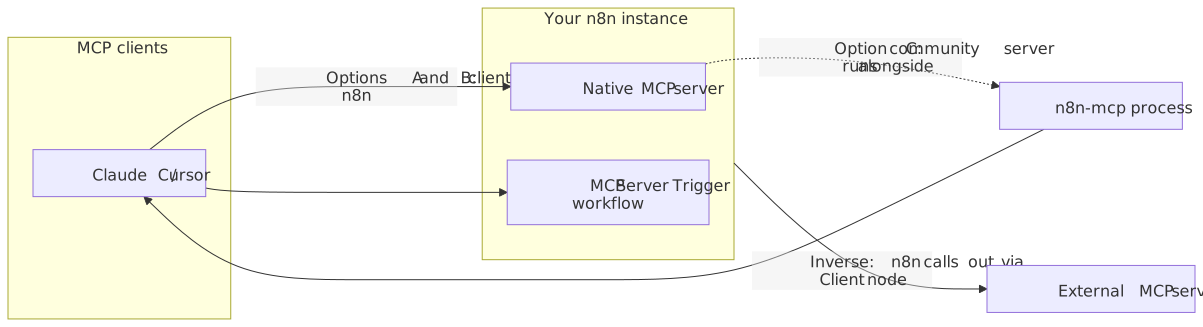
Name this explicitly so you do not wire the wrong node. If you are trying to let Claude run your n8n workflows, none of the Client nodes are involved. They are for the case where n8n itself is the AI application reaching out to someone else’s MCP server.
Operations and security for self-hosted
A few realities break real setups, so handle them in one place.
Reachability is the first. A custom connector in claude.ai requires your n8n to be publicly reachable, because the request comes from Anthropic’s cloud. If you keep n8n private, your only Claude option is a local stdio server in Claude Desktop, which rules out claude.ai entirely. If you do expose it, put it behind TLS and consider restricting inbound traffic to Anthropic’s published IP ranges, keeping in mind those ranges change and you will need to track the page.
Tokens and OAuth are the second. Prefer OAuth where the client and server both support it. Where you use a token, treat it as a credential: long, random, stored in a secret manager, never committed. For the community server’s management tools, scope the n8n API key as narrowly as your setup allows, since that key is full programmatic access to the instance.
The third is the one that causes real damage: do not let an AI edit production workflows directly. The native server’s tools can operate on unpublished workflows and execute_workflow runs the published version by default. Treat AI-driven edits as you would any other change: work on a copy or a draft, review the diff, and publish deliberately. An agent that rewrites a live workflow on a bad inference is a production incident, not a typo.
One protocol note for connector builders: Claude supports MCP tools, prompts, and resources but does not yet support resource subscriptions or sampling, so do not design a connector around capabilities Claude will not call.
Decision matrix: which path for which goal
| Goal | Path | You build? | Auth | Works in claude.ai? |
|---|---|---|---|---|
| Let Claude and Cursor read, run, and build workflows across the instance | Native instance-level MCP server | No, enable it | OAuth or MCP access token | Yes, if publicly reachable |
| Expose a curated set of tools as one endpoint | MCP Server Trigger workflow | Yes | Bearer or header credential | Yes, if publicly reachable |
| Make the AI author correct workflows with node-level accuracy | Community n8n-mcp server | No, run it | n8n API key, transport-dependent | Only if hosted as a public remote |
| Let an n8n workflow call an external MCP server | MCP Client or MCP Client Tool node | Inside a workflow | Per the external server | n/a, this is the inverse |
Start at the goal, not the tooling. If you want Claude to use your workflows, enable the native server and confirm public reachability. If you want one tightly scoped endpoint, build a Server Trigger workflow. If you are authoring heavily and want the AI to get node parameters right, run the community server. And if you find yourself reaching for an MCP Client node while trying to do any of the first three, stop, because you have turned the arrow around.